From Bob’s original Learning Nuggets archive. Instructions and screenshots refer to Trial Director 360.
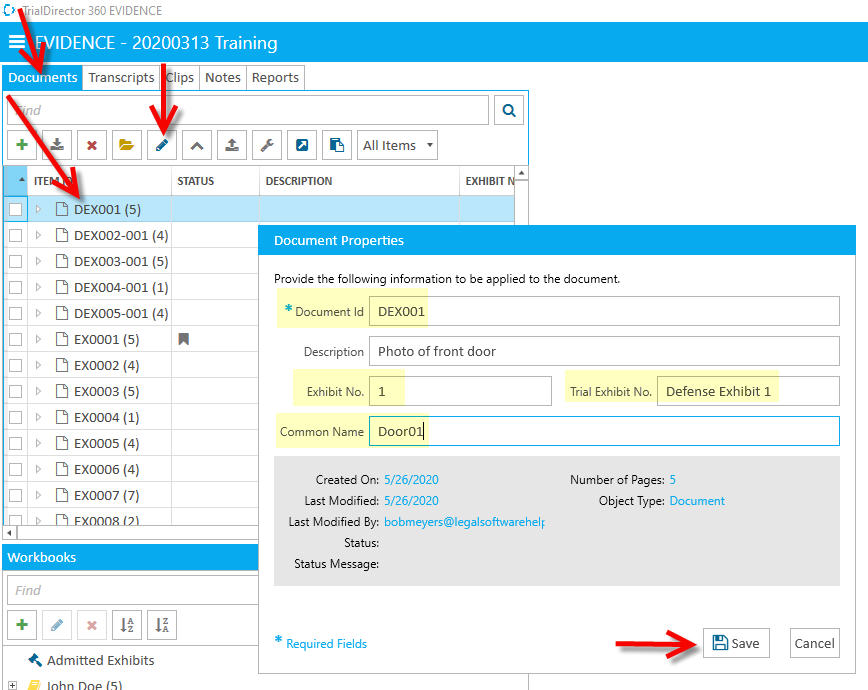
When loading exhibits, we have all sorts of flexibility for naming them. Once loaded, that name is displayed as the Item ID (or Page ID, depending). We see it listed when viewing all exhibits in Evidence. For Defense Exhibit 1, our example would be DEX001.
However, we have up to three other names we can assign to any given exhibit: Exhibit No., Trial Exhibit No. and Common Name. The only caution is that each and every name must be unique in this case.
1) Exhibit No.: We could enter the Deposition name/number here, or really, any name/number that might be helpful when calling the exhibit up in the proceeding.Alternatively, we might use the shortest exhibit numbering we could, such as "1" (minus the quotations).
2) Trial Exhibit No.: We could enter the formal name for the exhibit, such as Defense Exhibit 1. We might do this not for calling up in the courtroom. Rather, for using as the identifier for creating/placing exhibit stickers on our exhibits.
3) Common Name: Let's say this exhibit is a photograph of a door. We might call it by it's plain name, such as Door01. Something short, enumerated and descriptive.
The best news of all is that we can use any of these four names for this ONE exhibit to call up the exhibit in our presentation!
Instructional screenshots